
Webflow, Squarespace, or WordPress: Which CMS Should You Choose? An Honest Comparison.
Introduction: The End of the "Holy Wars"In the world of web development, debates about "which CMS is better" have raged for decades. But in 2026, the answer has become purely pragmatic: there is no such thing as the "best" CMS. There is only the right tool for your specific goals.
As a developer, I chose Webflow not because it’s trendy. I chose it because it’s the only platform that allows me to apply Occam's razor: creating powerful, high-end solutions without unnecessary entities, bloated plugins, or security holes.
Let’s honestly compare the three giants of the market.
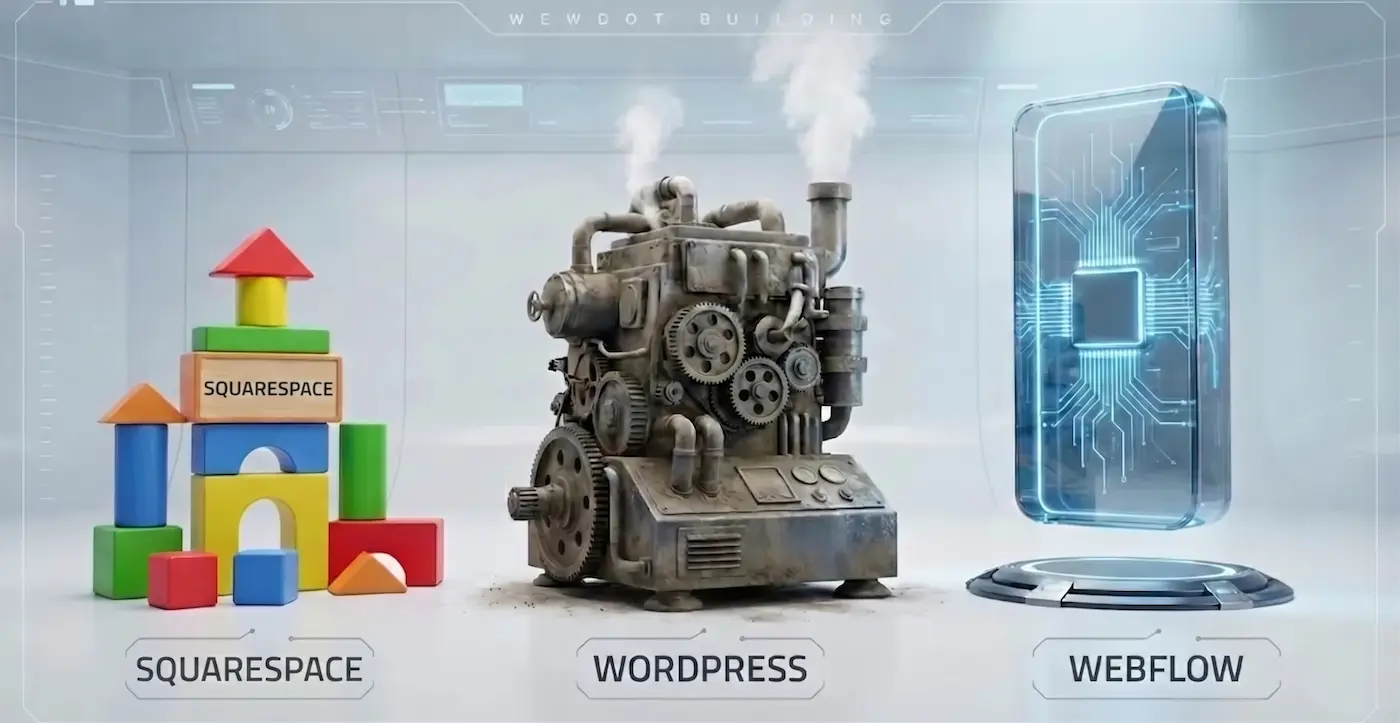
1. Squarespace: The King of MVPs and Quick Tests
Squarespace (much like Wix) remains an excellent tool for starting out. If you need to launch a landing page "tonight" to test a business hypothesis, this is your choice.
- Pros: Highly intuitive, lots of beautiful, ready-made templates.
- Cons (Why I don't use it for client work):
- "Design in a Cage": You are always restricted by their grid and blocks. One step to the left or right, and the layout breaks on mobile.
- Bloated Code: Squarespace generates redundant, heavy code, making it much harder to rank for SEO in competitive B2B markets.
- Platform Lock-in: You don’t own your code. If the platform shuts down or changes its pricing, you lose your website.
2. WordPress: The Aging Giant on Crutches
WordPress is the most popular CMS in the world, powering over 40% of the internet. But popularity does not equal efficiency.
- Pros: Infinite possibilities thanks to a massive ecosystem of plugins.
- Cons (The Hidden Threat):
- Plugin Hell: To set up SEO, a simple contact form, and a slider, you have to install 3 different plugins. They conflict with each other, slow down the site, and require constant updates.
- Security: WP is the most hacked CMS globally. Without constant technical maintenance, your site can easily turn into a spam farm.
- Speed: For a WordPress site to pass Google's Core Web Vitals in 2026, you need expensive dedicated hosting and hours of paid developer time for optimization.
3. Webflow: Visual Code for Professionals
Webflow is often confused with simple DIY website builders, but that is a fundamental mistake. It is a visual development environment. When I drag a block on the screen, Webflow writes clean, semantic HTML/CSS/JS code for me.
Why I choose Webflow:
- Clean Code: The site loads instantly. Search engines (Google, Bing) love these types of sites.
- Total Design Freedom: I can implement any complex animation and any custom grid. There are no templates; there is only your business objective.
- Security: It is a closed ecosystem. It cannot be "hacked" through a vulnerable plugin because there are no third-party plugins. Hosting on AWS (Amazon Web Services) ensures enterprise-level reliability.
- The Editor: You, as the client, can safely change texts and images directly on the live page without ever worrying about breaking the design.
Conclusion: Why I Choose Webflow for My Clients
My goal is to build you a website that you won't have to rebuild in a year. A website that brings in clients, rather than requiring constant technical repairs.
Webflow is an investment in stability and quality. It is a platform that respects both your time and your business's money. Want a website that flies instead of crawls? Let’s discuss migrating your project to Webflow.
Read new articles:









Рентабельные рекламные кампании в Яндекс.Директ
Настроим и будем вести контекстную и таргетированную рекламу для вашего бизнеса
Создадим систему привлечения новых клиентов
Уменьшим цену входящего звонка и заявки
Увеличим заказы на маркетплейсах: Ozon, Yandex Market, WB
Подготовим понятные отчеты и аналитику