
Website vs. Web Application: What Does Your Business Actually Need?
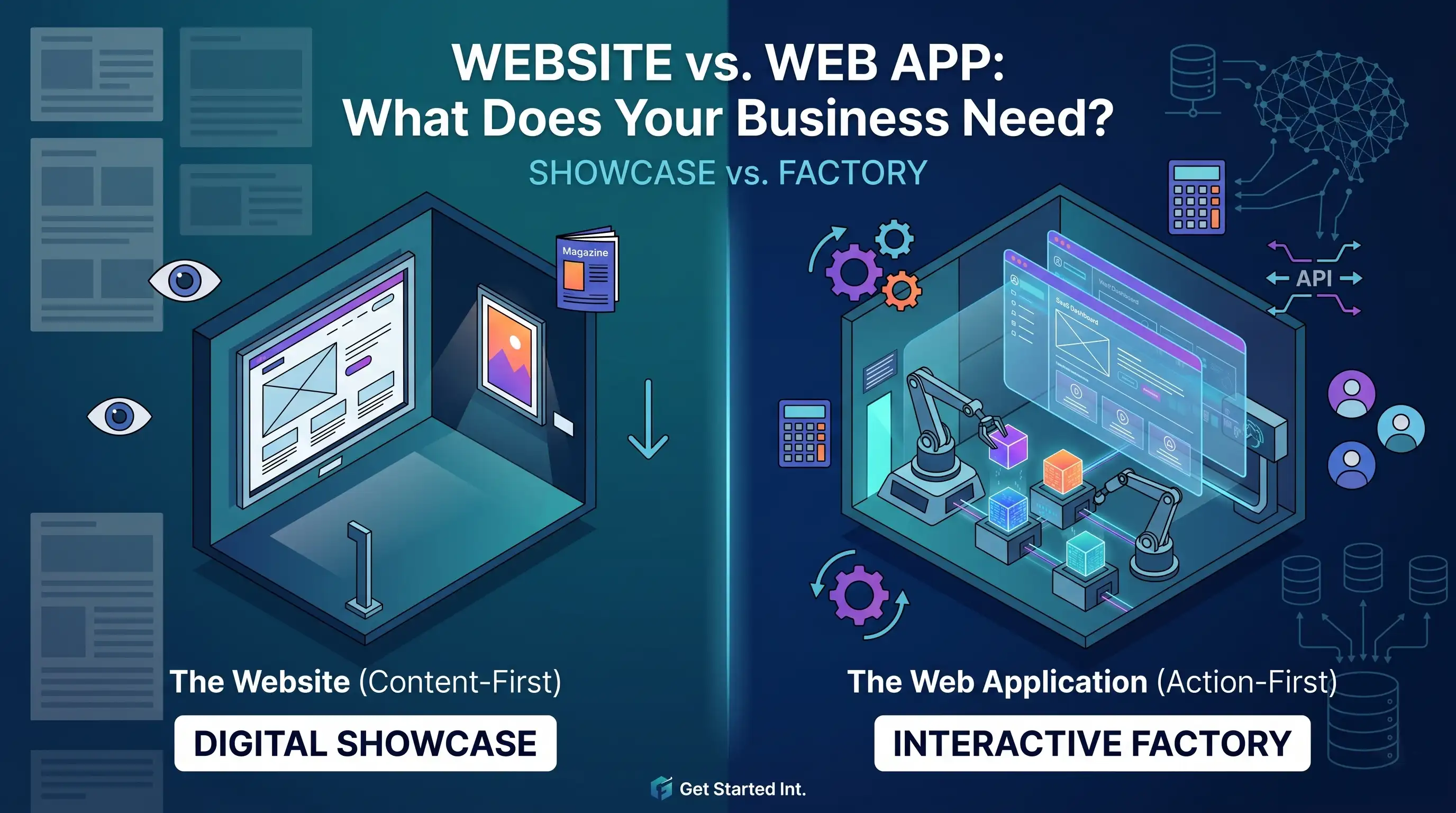
Website vs. Web Application: What Does Your Business Need? (Showcase vs. Factory)
This topic is a classic "trap" for businesses. Quite often, a client asks for "just a website," when they actually mean a client portal with custom calculations. Conversely, a developer might build "just a website" that is technically incapable of storing even basic order history.
In development briefs, we frequently see the phrase: "We need a standard website, but it should have user registration, a discount calculator, a client portal, and integration with our warehouse software."
The problem is that the words "standard website" and this requested "functionality" fundamentally contradict each other. It is like walking into a dealership and asking for a "standard sedan" that can haul 20 tons of bricks.
Let's break down the foundational differences so you do not overpay for unnecessary features or throttle your business with weak digital tools.
1. A Website is a Digital Showcase (Content-First)
At its core, a website is a digital magazine or an interactive catalog. Its primary task is to present information beautifully. The author populates it with text, photos, and videos, and the user consumes them.
- Business Analogy: Imagine a printed menu in a restaurant. You can flip through it, look at the pictures, and check the prices, but you cannot edit the recipe directly in the menu or see how many ingredients are left in the kitchen.
- The Technical Side: A website is a "passive" tool. It lacks complex business logic. The hosting server's disk space merely stores the site's files (text and media). Visitor data here is temporary. A website has no "memory"; it does not remember the visitor or store their information. To compensate for this flaw, temporary workarounds like "cookies" (small files saved to the user's computer) were invented.
- Best Suited For: Landing pages, corporate brochures, portfolios, and expert blogs. You cannot build complex IT systems on standard website platforms because they lack the tools for backend scripting, advanced APIs, and database management.
2. A Web Application is an Interactive Service (Action-First)
A web application is a fully-fledged software program that operates inside a browser. It may look identical to a website on the surface, but its primary goal is not to "show," but to "process." Here, the user does not just read; they create content and interact with the system.
- Business Analogy: This is no longer a menu; it is a self-service terminal or a mobile banking app. You input data, the system performs calculations, remembers your preferences, and customizes the interface specifically for you.
- The Technical Side: There is always a database, complex business logic, and API connections (communication with other services). The application "recognizes" you and remembers everything you did a year ago. Users actively participate in shaping the app's content.
- Best Suited For: CRM systems, client portals, banking interfaces, social networks, and online SaaS builders. Anything a website can do, a web app can do too—but the functional, calculative, and integration capabilities of a web app are infinitely broader.
The Main Differences: A Quick Overview
Why the Confusion?
The line between the two often blurs due to hybrid tools:
- CMS (Content Management Systems): To make a site easier to manage, a backend admin panel is attached. This makes it slightly "smarter" (e.g., for an e-commerce catalog), but architecturally, it remains a website.
- Multi-landing Pages: When a site dynamically changes its headlines based on your search query, it looks like magic. But it is just simple text substitution, not complex application logic.
- "Wrapper" Apps: Many mobile applications (like the NYT or CNN apps) are just convenient ways to view a website without a browser. Inside, it is standard web content.
Real-world example: When you log into gmail.com, you are using a powerful web application. When you visit the "About Us" page of a local manufacturing plant, you are on a website.
The Economics of IT Infrastructure
If you only need content (text, photos), standard website hosting is incredibly cheap (starting around $2/month). But the moment you add E-commerce features (carts, payments, inventory) or a CMS with heavy data flows, maintenance costs rise to web app levels ($29/month and up, depending on traffic).
Why does this happen? Because you stop renting simple "disk space" and start renting the server's "computational power." The server now has to "think" for your users.
What Should Your Business Choose?
- Choose a Website if your goal is SEO traffic, product presentation, lead generation via simple forms, or running an expert blog. It is cheaper, faster to launch, and easier to market.
- Choose a Web App if you are building a service: a dealer portal, an automated order management system, an engineering calculator, or an e-learning platform.
At Get Started, we do not just "make sites." We help you select the exact architecture for your business goals. If a clean, lightning-fast website is all you need, we will build a benchmark-quality asset on Webflow. If your business requires a digital "brain," we will engineer robust web application logic capable of handling any load.
Myths vs. Reality: What Founders Need to Know
⛔ Myth: "A web application is just a really expensive website."
✅ Reality: With a website, you pay for design and frontend coding. With an app, 70% of the budget goes into the "invisible" backend: database architecture, security, and processing your unique business logic.
⛔ Myth: "Web apps are only for massive enterprise corporations."
✅ Reality: Even small businesses drastically benefit from web apps. An automated client portal or an order calculation system saves your sales team dozens of hours every month.
⛔ Myth: "We will build a simple website first, and then easily turn it into an app later."
✅ Reality: That is like trying to turn a camping tent into a brick house. Usually, the entire architecture has to be rebuilt from scratch. It is much smarter to lay the foundation for scaling from day one by choosing the right tech stack (e.g., Webflow + Xano).
Not sure where to start? Reach out to us, and we will break down your project architecture during a free technical consultation!
Read new articles:






Рентабельные рекламные кампании в Яндекс.Директ
Настроим и будем вести контекстную и таргетированную рекламу для вашего бизнеса
Создадим систему привлечения новых клиентов
Уменьшим цену входящего звонка и заявки
Увеличим заказы на маркетплейсах: Ozon, Yandex Market, WB
Подготовим понятные отчеты и аналитику